ChatGPT Usage Limits Explained (2026): Free, Go, Plus and Pro Caps and Resets
As of October 2026, everyday text chats are unlimited on every ChatGPT plan, subject to abuse guardrails. The limits you actually hit are elsewhere: Free gets 3 file uploads a day and paid plans up to 80 files every 3 hours, voice runs on a rolling 24-hour allowance, and Work and Codex use 5-hour and weekly windows.
By PromoClock
Published Updated
On this page
Everyday text chats are unlimited on every ChatGPT plan as of October 26, 2026, subject to abuse guardrails. The limits people actually hit sit elsewhere: file uploads, images, voice, reasoning models, deep research, and the shared Work and Codex allowance, each with its own cap and its own reset clock. Here is every limit OpenAI publishes, plan by plan, what it doesn’t publish, and what to do when you run out.
What are ChatGPT’s usage limits in 2026?
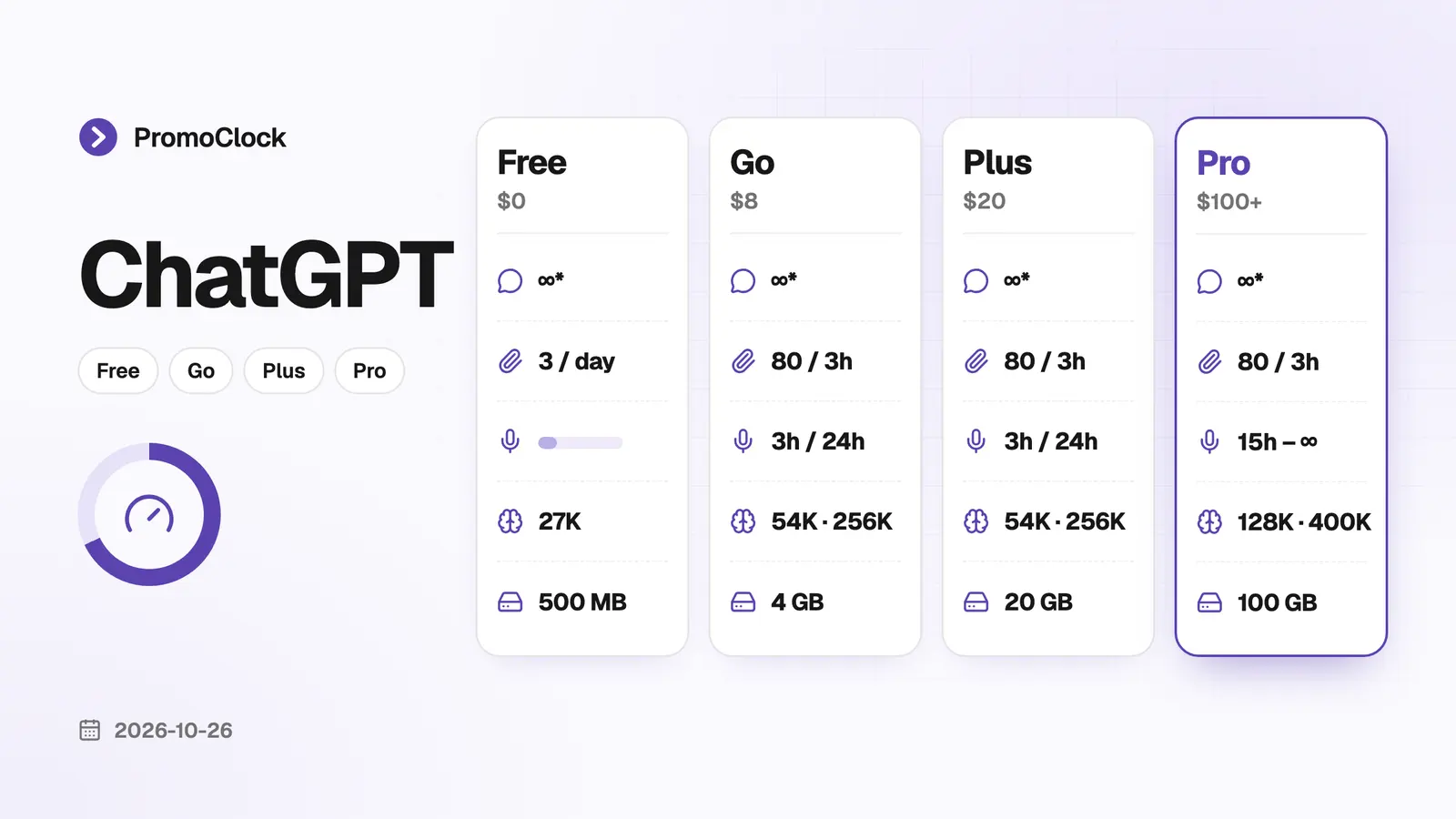
ChatGPT gives every plan unlimited everyday text, then limits tools separately: uploads, images, voice, deep research, reasoning models and the Work and Codex allowance. The table below combines OpenAI’s pricing page and help center as of October 26, 2026, with US prices.
| Limit | Free | Go | Plus | Pro |
|---|---|---|---|---|
| Price | $0 | $8/month | $20/month | $100, $200 or $500/month |
| Everyday text chats | Unlimited* | Unlimited* | Unlimited* | Unlimited* |
| Reasoning | Think button (a Luna model) | Think button (a Luna model) | GPT-6 at Medium and High | All levels, including GPT-6 Pro |
| File uploads | 3 a day | Up to 80 every 3 hours | Up to 80 every 3 hours | Up to 80 every 3 hours |
| Library storage | 500 MB | 4 GB | 20 GB | 100 GB |
| Voice (rolling 24 hours) | Limited | 3 hours | 3 hours | 15 hours on Pro $100, unlimited* on Pro $200 |
| Image creation | Limited | More | More, plus images with thinking | Unlimited* |
| Deep research | Limited | Limited | Expanded | Maximum |
| Work and Codex | Limited, desktop app | Monthly allowance | 5-hour and weekly windows | Weekly window, no 5-hour limit |
| Context window (Instant / Reasoning) | 27K / varies | 54K / 256K | 54K / 256K | 128K / 400K |
| Files per project | 5 | 25 | 25 | 40 |
| Active scheduled tasks | 3 | 3 | 5 | 15 |
*Subject to OpenAI’s abuse guardrails. “Limited”, “More”, “Expanded” and “Maximum” are OpenAI’s own words: it doesn’t publish numbers for those rows.
Our ChatGPT page tracks plan prices as they change.
Is ChatGPT really unlimited?
Text is unlimited on every plan, but tools are not. OpenAI’s help center says: “Free and Go users have unlimited everyday text chats, subject to abuse-prevention safeguards.”
OpenAI announced unlimited text for Free and Go in its August 6, 2026 release notes. The same article adds that “separate limits continue to apply to file uploads, image generation, voice, data analysis, and other tools.” So a Free user can chat all day but still runs out of uploads, images or voice.
Two other things stay limited on every plan:
- Context. The context window decides how long a conversation can get before older messages fall out of view: 27K tokens with GPT Instant on Free, 54K on Go and Plus, 128K on Pro. Reasoning models get 256K on Go and Plus and 400K on Pro.
- Reasoning models. Thinking and Pro reasoning have their own allowances, even where text is unlimited.
Business plans follow the same rule. OpenAI’s Business help page says virtually unlimited access “does not make reasoning, Pro, ChatGPT Work, Codex, or other tools unlimited.”
How do ChatGPT’s Thinking and Pro limits work?
Reasoning models have their own allowance, and OpenAI doesn’t publish the number for Plus or for the Think button on Free and Go. When you reach a Thinking limit, “ChatGPT may continue with another available model,” so you can keep chatting with a lighter model.
Which reasoning you get depends on the plan:
- Free and Go get a Think button that runs a Luna model. OpenAI’s pages name it differently (GPT-5.6 Luna in the help center, GPT-6 Luna on the pricing page).
- Plus gets GPT-6 at Medium and High thinking, but not Extra High or Pro.
- Pro gets every level, including GPT-6 Pro, powered by GPT-6 Astra.
Pro isn’t unlimited for the strongest model. OpenAI states that “a Pro subscription does not include unlimited use of the GPT-6 Pro model.” On Pro $200, ChatGPT switches to GPT-5.6 Thinking at Medium when your weekly GPT-6 Pro limit runs out. On Pro $100, GPT-6 Pro and GPT-5.6 Sol Pro share one weekly allowance.
Pro $200 also changed. According to OpenAI’s Pro tiers page, subscribers active from September 22 to September 29, 2026 kept their previous allowance through October 29, 2026, then moved to the lower allowance at the same $200 price.
How many files can you upload to ChatGPT?
ChatGPT takes up to 80 files every 3 hours, with a 512 MB maximum per file, according to OpenAI’s file uploads FAQ. Free users are limited to 3 file uploads a day.
The size limits apply on every plan:
- Documents and presentations: 512 MB per file and 2 million tokens per text file.
- Spreadsheets: about 50 MB, depending on row size.
- Images: 20 MB each.
- Audio: up to 512 MB, on paid plans only.
Three details trip people up. OpenAI “may lower these limits during peak hours.” ChatGPT doesn’t show how much of your upload quota is left. And failed uploads can count toward the limit.
Storage is separate from the upload rate. Your Library holds 500 MB on Free, 4 GB on Go, 20 GB on Plus and 100 GB on Pro. Projects hold 5 files each on Free, 25 on Go and Plus and 40 on Pro, and you can upload at most 10 files to a project at once.
How many images can ChatGPT make per day?
OpenAI doesn’t publish a daily image number for Free, Go or Plus. The pricing page lists Free as “limited,” Go as “more,” Plus as “more complex and accurate image creation” and Pro as “unlimited and faster,” subject to abuse guardrails.
What OpenAI does say:
- Every plan can create images. The current model is ChatGPT Images 2.5, released September 8, 2026, and OpenAI said that release left existing limits unchanged.
- Images with thinking are available on Plus, Pro and Business, not on Free or Go.
- The only published number is for Edu workspaces: 3 image generations per rolling 24 hours.
- Upgrading resets the cap. When a Free user hits the image limit, ChatGPT offers Plus, and upgrading resets your usage.
Free users who turn on Ads-Free mode lose image generation entirely. That mode lowers message limits and drops tools such as image generation and deep research. Our ChatGPT ads guide explains the trade-off.
What are ChatGPT’s voice, deep research and agent limits?
Voice is measured over a rolling 24 hours, and deep research resets 30 days after your first use. Both depend on the plan:
| Feature | Free | Go | Plus | Pro |
|---|---|---|---|---|
| Voice (rolling 24 hours) | Limited | 3 hours (Quip model) | 3 hours | 15 hours on Pro $100, unlimited* on Pro $200 |
| Voice with video and screen sharing | No | Yes | Yes | Yes |
| Deep research | Limited | Limited | Expanded | Maximum |
| Agent mode | Not available | Not listed | 40 messages a month | 400 messages a month |
OpenAI’s voice article says ChatGPT notifies you when you reach a limit. Since September 9, 2026, Plus and Pro no longer switch to a smaller voice model at the limit. Deep research has an in-product counter that shows how many tasks you have left. The agent mode figures come from OpenAI’s agent help page, which doesn’t break out the three Pro tiers.
How do ChatGPT Work and Codex limits work?
ChatGPT Work and Codex share one allowance. On Plus it runs in a 5-hour window plus a weekly window, and you need allowance left in both to continue. OpenAI says the allowance “does not correspond to a fixed number of messages or tasks.”
The structure differs by plan:
- Go: one monthly allowance.
- Plus: a 5-hour window plus a weekly window. A new 5-hour window starts with your first message after the previous one ends.
- Pro $100, $200 and $500: no 5-hour limit, only the weekly allowance.
- Free: limited Codex in the desktop app; Codex cloud tasks aren’t included on Free or Go.
For Plus, OpenAI estimates how many local messages fit in one 5-hour window, by model. These are ranges, not fixed limits, and cloud tasks use more:
| Model in Work or Codex | Local messages per 5 hours (Plus) |
|---|---|
| GPT-6 Astra | 5–45 |
| GPT-6.1 Sol | 15–160 |
| GPT-6 Sol | 15–150 |
| GPT-6.1 Terra | 35–285 |
| GPT-6 Luna | 350–3,000 |
Speed settings cost extra allowance: Fast uses included usage at 2.5x and Ultrafast at 8x, and Ultrafast is limited to Pro $500. If you hit the limit mid-task, Codex can finish that turn, subject to fair use. For agents beyond ChatGPT, see our Codex page.
When do ChatGPT limits reset?
Each ChatGPT limit resets on its own clock: 3 hours for uploads, 24 hours for voice, 5 hours and a week for Work and Codex, and 30 days for deep research. None of them resets at midnight for everyone.
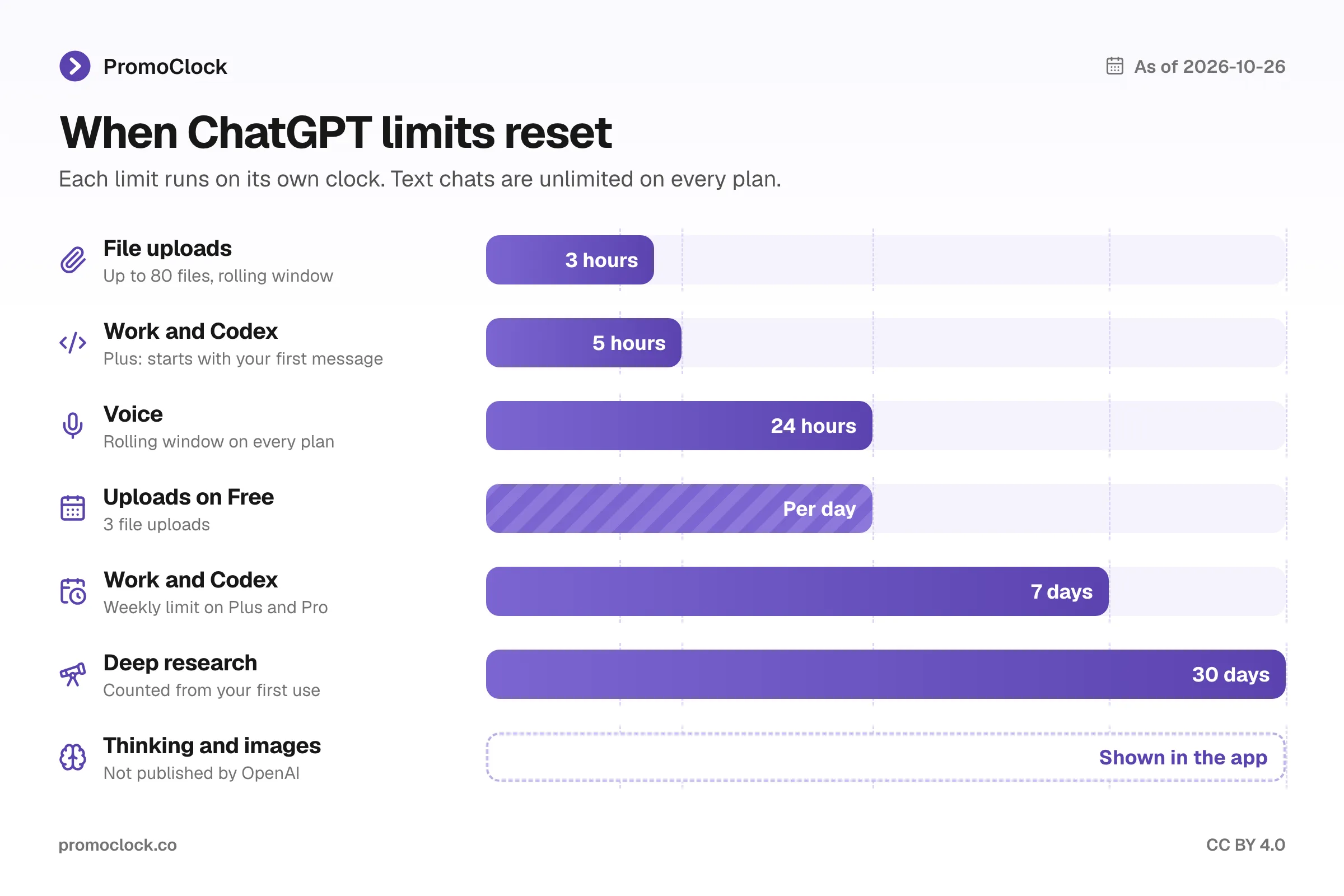
- File uploads: a rolling 3-hour window for the 80-file limit. Free’s 3 uploads are counted per day.
- Voice: a rolling 24 hours, so minutes come back 24 hours after you used them.
- Work and Codex: the 5-hour window starts with your first message after the last one ended, and the weekly window resets 7 days later.
- Deep research: fixed monthly allowances reset every 30 days from the date of your first use.
- Thinking and image limits: ChatGPT shows the reset time “when that information is available.” OpenAI doesn’t publish fixed windows for them.
Settings → Usage shows the remaining allowance and reset times for Work and Codex, and in the Codex CLI the /status command shows the same. Claude works differently: its chat and Claude Code share one rolling 5-hour session, as our Claude usage limits guide explains.
What should you do when you hit a ChatGPT limit?
Start by checking which limit you hit, because each one has a different fix. Text keeps working, and OpenAI’s support team won’t reset any limit for you.
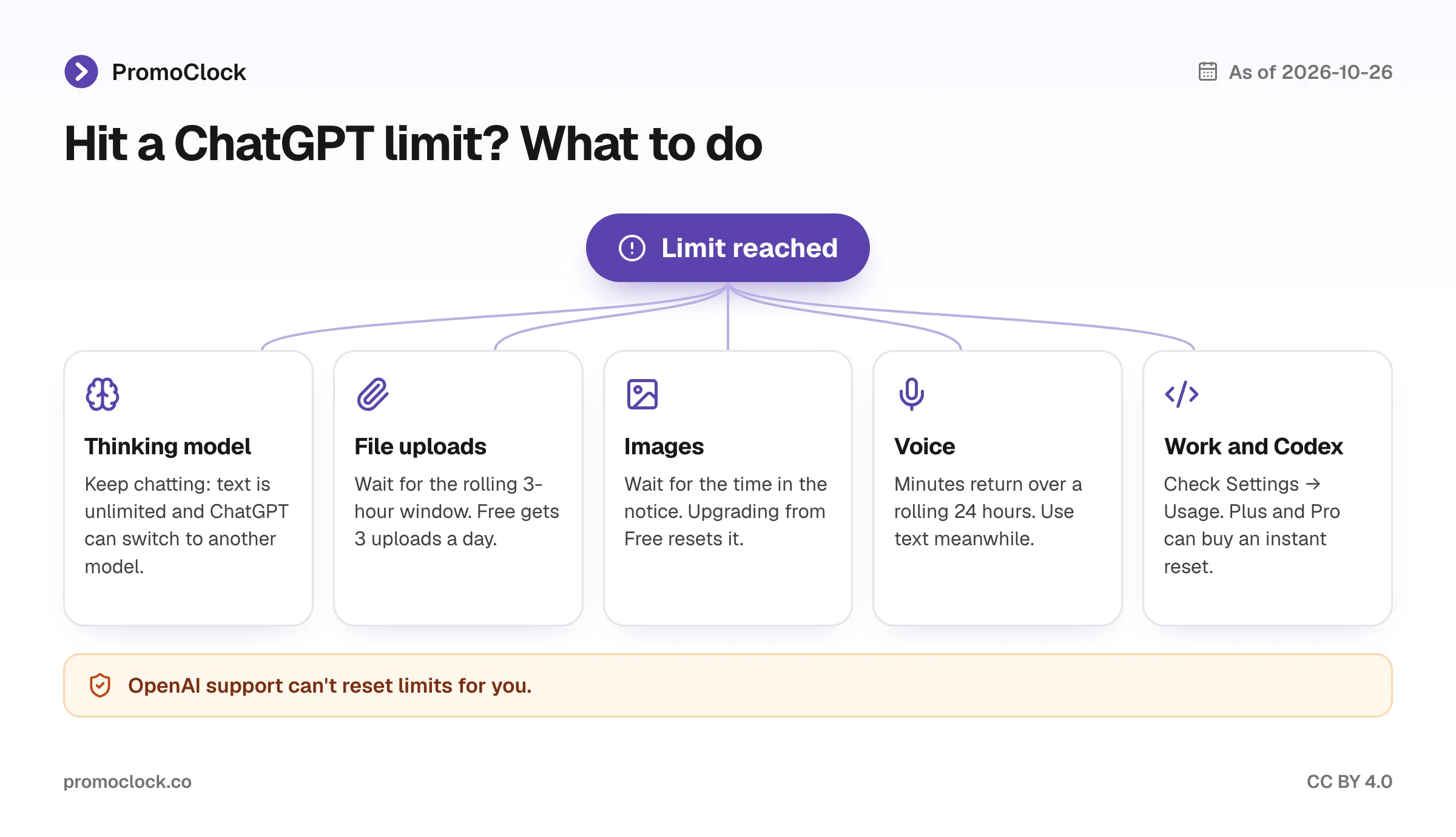
- Thinking limit: keep going. ChatGPT may continue with another available model.
- Upload limit: wait for the rolling 3-hour window, or combine several documents into one file, since the limit counts files.
- Image limit: wait for the reset time in the notice. On Free, upgrading resets the limit.
- Voice limit: switch to text or wait for the rolling 24 hours to free up minutes.
- Work and Codex limit: check Settings → Usage. On Plus and Pro, once the weekly limit runs out, a banner offers an instant reset.
An instant reset “immediately restores both 5-hour and weekly usage,” according to OpenAI’s reset article. Your next weekly reset then moves to 7 days after your first request. The price appears only at checkout, OpenAI generally doesn’t refund it, and it isn’t available on Free, Go, Business, Enterprise or Edu.
Which ChatGPT plan should you pick for higher limits?
Pick the plan for the limit you keep hitting, not for text, which is already unlimited. For most people that’s Plus at $20/month.
- Free: fine for text-only use. The 3 uploads a day and limited images run out first.
- Go at $8/month: more uploads, images and memory plus 3 hours of daily voice, but no GPT-6 Thinking and no ad-free option. Ads can appear on Go.
- Plus at $20/month: GPT-6 reasoning, 20 GB of storage, images with thinking and the 5-hour Work and Codex window. It’s the cheapest plan without ads.
- Pro at $100, $200 or $500/month: larger context windows (128K and 400K), no 5-hour Codex window, 15 hours to unlimited voice and maximum deep research.
Paid plans bill monthly, with no annual discount on Go, Plus or Pro. Our guide to saving money on AI subscriptions covers cheaper routes, and our ChatGPT vs Claude vs Gemini comparison shows how the three $20 plans differ.
How do ChatGPT’s limits compare with Claude and Gemini?
ChatGPT now lists everyday text as unlimited on every plan, but it publishes fewer numbers for its tools than Gemini does. Claude uses one rolling 5-hour session plus a weekly cap for chat and Claude Code together, and peak hours make sessions drain faster on weekdays. Gemini publishes daily caps per plan on Google’s help center, including prompts, images and Deep Research reports.
The practical difference: on ChatGPT you rarely run out of chat, but uploads, images and Codex run out first. On Claude, long chats and coding share one allowance, so heavy use can hit the session limit sooner.
Bottom line
ChatGPT’s text is unlimited on every plan, so judge plans by the tools you use, and learn each tool’s reset clock.
- Casual users on Free: text is unlimited; plan around 3 uploads a day.
- Students and light users: Go at $8/month lifts uploads, images and voice, but keeps ads and skips GPT-6 Thinking. OpenAI’s 4 free months of Plus for US college students closed on October 31, 2026, but verified US and Canadian university students can still get $100 in ChatGPT credits for Codex.
- Daily users and coders: Plus at $20/month, and check Settings → Usage before long Work or Codex sessions.
- Heavy agent and research users: Pro removes the 5-hour Codex window and raises context and deep research. Pro $200 subscribers have been on the lower allowance since October 30, 2026.
- Anyone at a limit: don’t contact support for a reset. Wait for the window, switch model or tool, or upgrade.
What to do when you hit a ChatGPT limit
Step by step
Check which limit you reached (uploads, images, voice, a reasoning model, Work or Codex) and the reset time ChatGPT shows.
Everyday text chats stay unlimited, and ChatGPT may continue with another available model when you reach a Thinking limit.
Uploads free up within a rolling 3 hours, voice within a rolling 24 hours, and Work and Codex at the 5-hour or weekly reset.
For Work and Codex, see your remaining allowance and reset times before starting a large task.
On Plus or Pro, buy an instant Work and Codex reset after the weekly limit, or upgrade your plan to reset Free limits.
Frequently asked questions
Sources
- chatgpt.com/pricing
- help.openai.com/en/articles/11909943
- help.openai.com/en/articles/9275245
- help.openai.com/en/articles/8555545-file-uploads-faq
- help.openai.com/en/articles/20001052
- help.openai.com/en/articles/11084440
- help.openai.com/en/articles/20001274
- help.openai.com/en/articles/10500283
- help.openai.com/en/articles/20001516
- help.openai.com/en/articles/20001507
- help.openai.com/en/articles/9793128
- help.openai.com/en/articles/10169521
Facts checked against official sources on